 MU TMT
Patches in seconds
The launcher compares your game with the latest version and downloads only the new files. A small patch is a small download.
Official launcher · Windows 10 and 11
Download the MU TMT launcher. It installs the game, keeps it up to date on its own, and tells you about every news item.
Sign up on the website. Your username and password also log you in to the game.
Create accountOpen MU-TMT-Setup.exe. It does not ask for administrator rights and takes a few seconds.
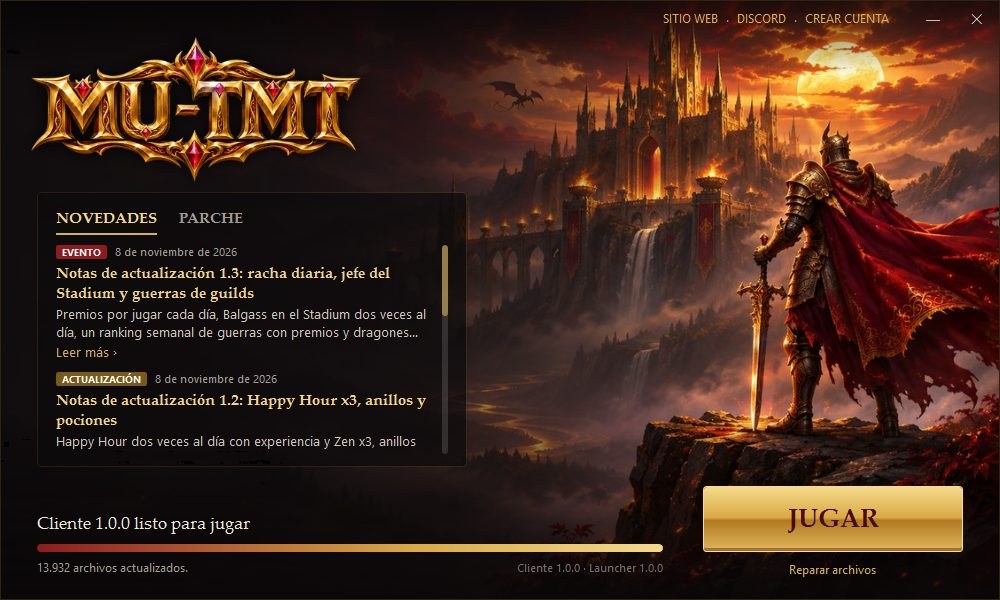
The first time, the launcher downloads the game (384 MB). After that, each patch downloads only what changed.
The launcher compares your game with the latest version and downloads only the new files. A small patch is a small download.
The News tab shows the latest server events and updates. The Patch tab tells you what your version contains.
If a file is damaged or missing, the Repair files button checks the whole game and downloads again only what is needed.
If the download server does not respond, you can still play with the client you already have installed.
Yes. Downloading and playing MU TMT is free. The shop is optional.
No. The new installer uses the same folder. The launcher checks the files you already have, downloads only the ones that changed, and keeps your settings.
Yes. The installer does not have a digital signature yet, and that is why Windows SmartScreen shows this warning. Choose "More info" and then "Run anyway". You can check the file with its SHA-256 at the bottom of this page.
In your user folder: %LOCALAPPDATA%\MU TMT. That is why it does not ask for administrator rights.
You do not have to do anything. Open MU TMT from the desktop or the Start menu: the launcher looks for the latest version before every session. If there is a patch, the button says Update.
Open the launcher and press Repair files. It checks the whole game and downloads again anything that is damaged. If your antivirus removed a file, add the game folder to its exceptions before you repair.
Use the username and password of your website account. If you do not have one yet, create it here.
Not officially. MU TMT is for 64-bit Windows 10 and 11.
In Windows, open Settings, then Installed apps, find MU TMT Online, and choose Uninstall. This removes the launcher and the game.
The team and the community help you in the support channel of our Discord.
To check that the file did not change, open PowerShell in the downloads folder and compare the result with this value:
Get-FileHash MU-TMT-Setup.exe007bc48843e3902ad5c19e3f411f57c48e6d2d9e024f8266526a792d80c56b91