 MU TMT
New player Market in Loren Market (client 1.3.0)
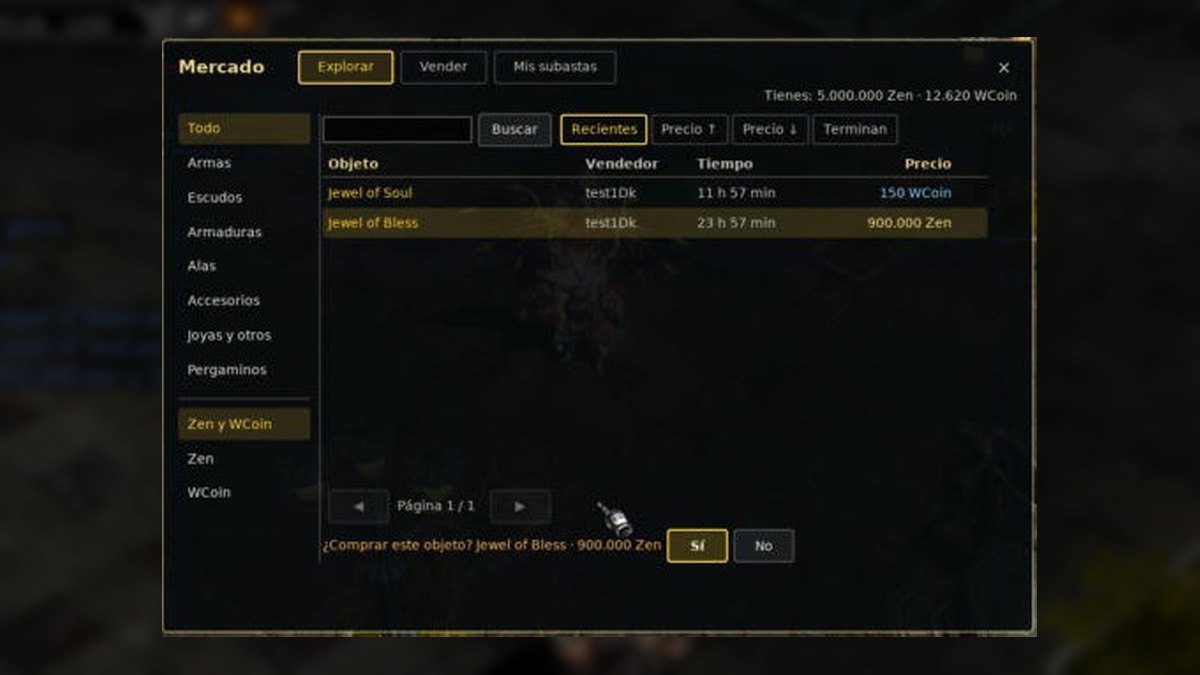
Player Market: list an item at your price, in zen or in WCoin, and another player buys it also when you are offline. You choose the price.
How to get there: in Lorencia, talk to Julia to go to Loren Market. Find the Merchant at 119, 128 and talk to him.
The window has 3 tabs. Browse: filter by category and currency, search by name and sort by price. Sell: choose the item, the price and a duration of 12, 24 or 48 hours. My auctions: see and cancel your listings.
Automatic payment: when somebody buys your item, the payment goes to your character. If you are offline, it arrives the next time you enter the game. If your inventory is full, the Market tries again every 5 minutes.
Launch fee: 1 % of the sale. When you list an item, you pay a deposit of 1 % of the price in zen, with a minimum of 10,000 zen. If the item sells, you get the deposit back. You can have 20 active listings per account.
Prices: the Economy page of your panel shows the price of each done sale, in zen and in WCoin.
Full guide with pictures: mutmt.nwart.app/Wiki/Mercado.
Christmas: from December 1 to January 6, the fountain of Lorencia is a Christmas tree. Client 1.3.0 already has it.
Open the launcher to update to version 1.3.0. Without that version, the Merchant does not open the window.