 MU TMT
Jeweler: the jewel bank of your account (client 1.5.0)
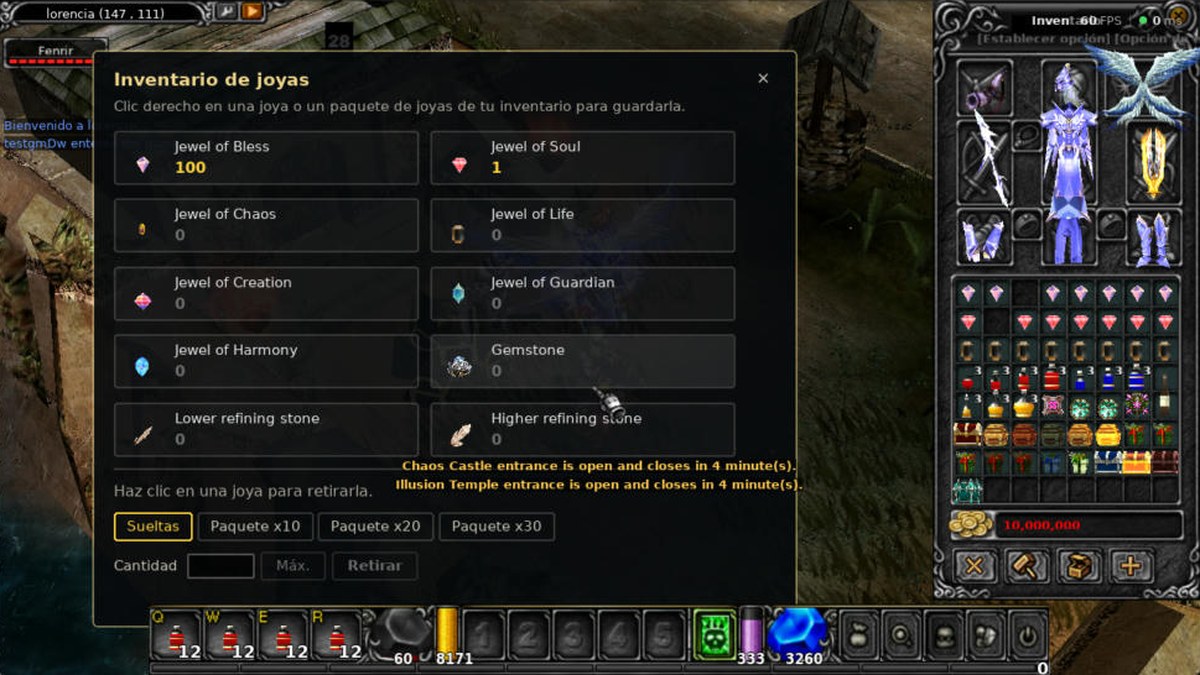
Talk to the Jeweler in Lorencia, next to the vault keeper (148, 110). The jewel bank and your inventory open.
Store: right-click a jewel or a jewel pack in your inventory. A pack of 10, 20 or 30 adds 10, 20 or 30 to the count.
Withdraw: click the jewel, choose single jewels or packs of 10, 20 or 30, type the amount or use Max, and click Withdraw.
It holds 10 kinds: Bless, Soul, Chaos, Life, Creation, Guardian, Harmony, Gemstone and the two refining stones.
The jewels belong to the account: all your characters see the same jewel bank.
New client installs start at 1280 × 720, and Options offers widescreen (16:9) sizes.
Open the launcher to update to version 1.5.0. Without it, the Jeweler only shows a message.